You have gone to the trouble of building some great online content, but the wheels can still fall off if you haven’t set the activity completion or course completion in your Moodle course.
Setting the activity completion requirements in each activity in your course helps learners understand what is required of them and just as importantly helps them keep track of their progress. When a learner doesn’t understand what is required of them or can’t easily identify what they have completed, it can quickly lead to frustration and disengagement.
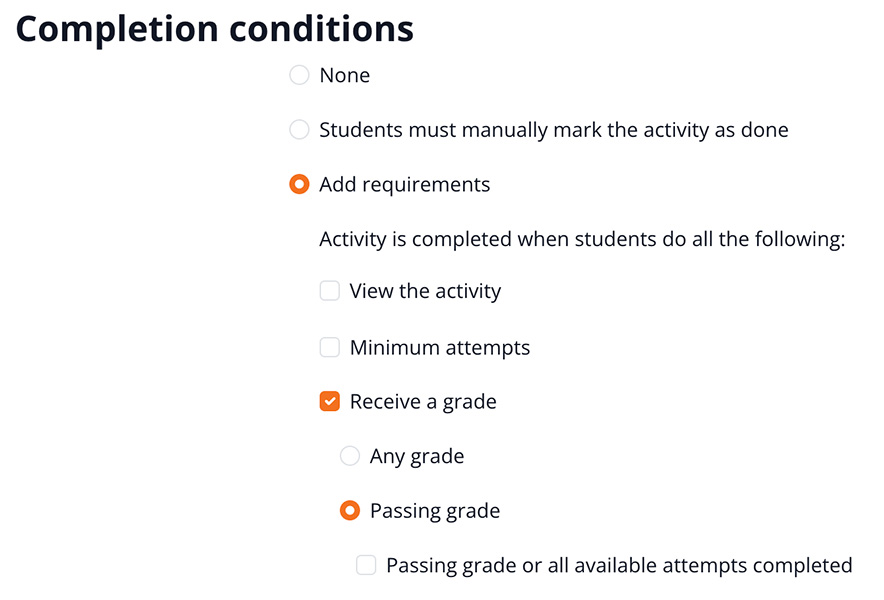
Choosing the right activity completion requirement is usually simple, but there are activity types and circumstances where you may want to take a moment to think about which option you should choose. For instance, setting the requirement that the learner needs to view a Moodle page, book or URL is a no brainer and only takes seconds to activate.
However, when it comes to activities such as assignments, quizzes and forums there are more activity completion options to choose from. When choosing your setting, think about what is most important and what will be the most reliable choice. For instance, when setting up an assignment does it matter whether the learner or the facilitator uploaded their submission? In most cases it is the grade/result they achieve that is more important than who uploaded the file.
Quizzes have even more options for you to choose from, so take a moment to think about what your requirements are. In many cases it will be that the learner needs to achieve a passing grade rather than if they viewed the quiz or how many attempts they made. So, take the time to review your quiz score set up and match the activity completion settings to the score required.
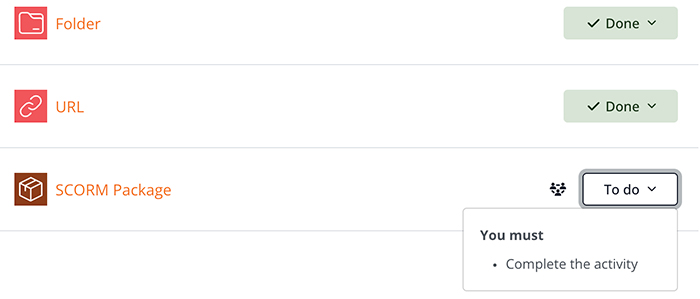
When setting up SCORM packages it is important to know what completion settings were set in the authoring tool. For instance, you have built a Rise360 course that has a quiz and the quiz has a pass mark. You publish your Rise360 course that the quiz is what is tracked and that it will mark off as passed. Your activity completion settings for the SCORM package in Moodle need to match the Rise360 settings which in this case would be ‘Passed’.
There will also be times when you will purposefully choose not to set activity completion for an activity or resource in a Moodle course. Let’s say you have added an optional resource or a resource that the learner doesn’t complete per se but can refer to as needed, such as FAQs. In these cases, you may decide to only set activity completion for the important activities and resources in your course.
You could also choose that learners can manually mark the resource or activity as complete. Usually it is best to set that the activity completion will automatically trigger, rather than relying upon a learner remembering to mark it off. However, it can be useful when the item isn’t crucial, and you would like to allow the learner to choose to mark it as done.
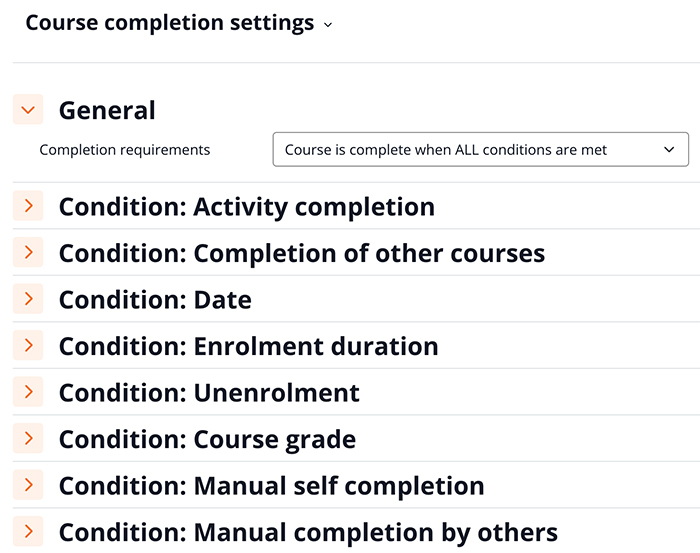
The final piece of the puzzle is course completion. This helps the learner know when the course is deemed as finished as it shows the percentage complete on their ‘my courses’ page and triggers an email and notification that they have completed the course. It also helps you get better reporting both within the course level reports and in a custom report.
Course completion settings can also be handy if you want to specify that only certain activities in the course are mandatory and required for completion of the course. You could also choose a setting that combines the learners progress in the course and allowing a facilitator to make the final judgement that the learner has met all the course requirements.
Taking just a few moments to set both activity and course completion makes a big difference for both learners and facilitators and ensures you have the data you need to accurately track and report on the learning journey. Now it’s time to jump into one of your Moodle courses and see if you can optimise your completion settings.